Africa
How Real Estate Agents Can List Properties on MacVillas.com and Reach More Buyers Online



In today’s competitive real estate market, having a strong online presence is essential for every property agent. Buyers, renters, and investors now search online first before making property decisions. For agents, this means that listing properties on trusted digital platforms is one of the fastest ways to attract serious clients and grow a successful real estate business.
MacVillas.com provides real estate agents with an easy and professional platform to showcase properties, connect with potential buyers, and increase visibility across West Africa and beyond.
If you are a real estate agent looking to expand your reach, here is a step-by-step guide on how to register on MacVillas.com and start listing your properties online.
Why Real Estate Agents Should Join MacVillas.com
The platform is designed to simplify property marketing while helping agents build trust and attract more clients.
By signing up, agents can:
- Reach a wider audience of property buyers and renters
- Advertise verified property listings online
- Build a professional real estate profile
- Receive direct inquiries from interested clients
- Manage multiple property listings from one dashboard
- Promote houses, apartments, lands, and commercial properties
For agents seeking better online visibility, MacVillas.com offers a modern solution for digital real estate marketing.
Step 1: Visit MacVillas.com
Open your preferred web browser and visit the official website.
Once the homepage loads, locate the Sign Up or Register button, usually found at the top-right corner of the homepage.

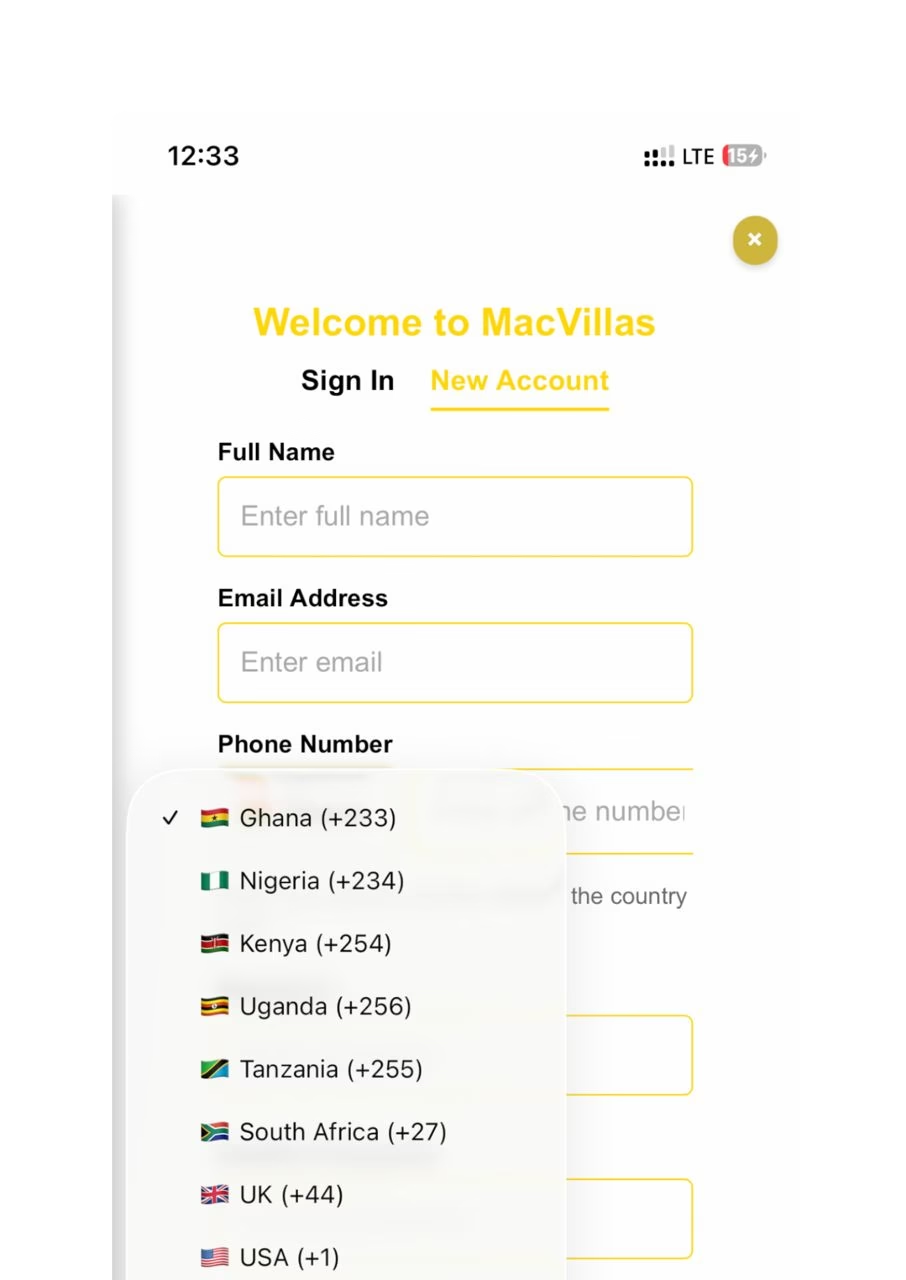
Step 2: Create a Real Estate Agent Account
Click on the registration option and select Agent Registration.
You will be asked to provide important details including:
- Full Name
- Email Address
- Phone Number
- Password
Ensure all information provided is accurate so prospective clients can contact you easily.
Step 3: Verify Your Account
After completing registration, the platform may send an OTP or verification email to your inbox.
Check your spam or junk folder if you do not see the email immediately.
Follow the instructions provided in the email to activate and verify your account.
Verification helps maintain trust and ensures only genuine real estate agents use the platform
.
Step 4: Sign In to Your Agent Dashboard
Once your account is verified, sign in to access your agent dashboard.
Your dashboard allows you to manage your profile, upload properties, edit listings, and monitor inquiries from potential clients.
A complete and professional profile increases credibility and attracts more buyers and renters.
Step 5: Start Listing Your Properties
From your dashboard, click on List Property.
You will be required to enter important property information such as:
- Property title
- Property type (house, apartment, land, commercial property, etc.)
- Property location
- Property price
- Number of bedrooms and bathrooms
- Property description
- Available amenities
- Photos and videos
Use clear descriptions and high-quality property images to improve visibility and attract serious inquiries.
Step 6: Upload and Manage Your Property Listings
After entering all required details, click Upload to publish your listing.
Your property will now become visible to potential buyers, renters, and investors browsing the platform.
Agents can also:
- Edit existing listings
- Update property prices
- Mark properties as sold or rented
- Upload additional properties anytime
The dashboard makes property management simple and efficient.
Tips for Better Real Estate Results Online
To improve performance and attract more property clients on MacVillas.com:
- Upload professional-quality property photos
- Write detailed and honest property descriptions
- Use competitive pricing
- Update listings regularly
- Include accurate property locations
- Add videos where possible for better engagement
Well-presented listings usually attract more inquiries and faster transactions.
Grow Your Real Estate Business with MacVillas.com
Whether you specialize in residential homes, apartments, land sales, luxury properties, or commercial real estate, MacVillas.com gives agents the visibility needed to connect with serious buyers and renters.
As more people search online for properties, joining a trusted real estate platform can help agents grow their business faster and increase property sales.
If you are ready to expand your real estate business, sign up today on MacVillas.com and start listing your properties with confidence.